
GLP-1 Dose Tracker for Every Shot, Pill and Step-Up
Log the dose your prescriber set in a couple of taps, follow your step-ups, and keep a dose history you can trust.


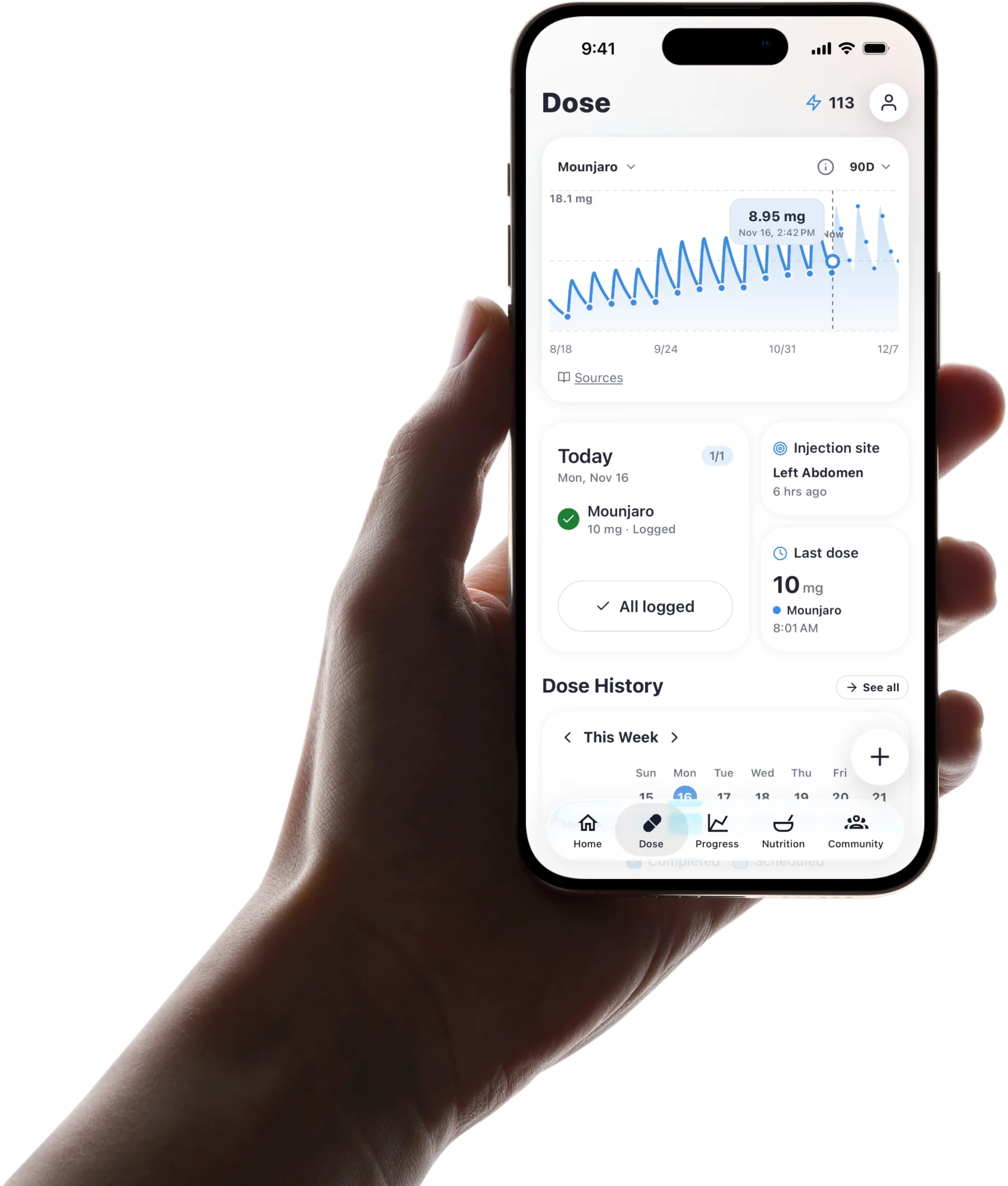
Published by Pep AI · GLP-1 dose tracker · Updated November 2026
Pep AI records each GLP-1 shot or pill with its date, time and dose, following the schedule and step-ups your prescriber gave you. Your dose history builds itself as you go.
Pep AI never suggests, calculates or changes a dose. It keeps a clear record of what you were told to take, so you never have to wonder what you took last week.
Pep AI is free to try: a free download with a 3-day free trial, then a subscription for tracking. Pep AI is rated 4.7 from 4,000+ ratings on the App Store, and it has passed 200,000+ downloads across iPhone and Android.
What Pep AI Records With Each Dose
Each entry keeps the medication and its form (a weekly pen, a single-dose vial such as a Zepbound® or Mounjaro® vial, a daily shot or a pill), the dose exactly as you entered it, and the date and time you took it, even if you log it later. Pep AI never rounds or converts the dose.
Shots also keep their site on a body map, and a supply count runs down from what you enter, with an estimate of days left. A scheduled dose that was not logged shows as overdue once its time passes.
The injection tracker app page walks through each shot entry in detail, and the injection site tracker page covers rotation.
Enter Your Step-Up Schedule Once
Step-ups are when people most often lose track of what they are on. Enter the plan once and the schedule follows it.
Copy the Steps From Your Prescriber
In the medication's schedule, add each titration step with its dose and how long it lasts, the way your prescriber wrote them. Pep AI does not fill in steps for you.
If your plan has no fixed dates yet, add the next step when your prescriber confirms it. The log follows whatever you enter.
See Which Dose Is Due
Your schedule follows the steps you entered, so the dose due on each dose day matches the step you are on. There is no flipping back through notes to check.
Your dose history keeps every entry with its dose and date, so the weeks on each dose are easy to count.
Update It When Your Prescriber Changes the Plan
Plans change, and Pep AI follows. Edit the schedule after your appointment and the new dose applies from then on.
Older entries keep the dose that was true at the time. Your history never gets rewritten.
Get a Nudge on Dose Day
Reminders follow the same schedule, so the right dose shows on the right day. Weekly, daily and custom reminders are covered on the GLP-1 injection tracker page.
Once the dose is taken, log it in the app. On iPhone (iOS 17 or later), the Lock Screen Live Activity also has a Log button.
Dose Steps Listed on the FDA Labels
These are the label schedules, quoted for reference. They are not a plan for you and not dosing advice: your own schedule may differ, and your label and your prescriber are the sources that apply to you. Each label is linked under Sources below.
Each of these labels also carries a boxed warning about the risk of thyroid C-cell tumors. Read the full label that comes with your medication.
| Medication | Starting dose | Step pattern | Maximum dose | Label revised |
|---|---|---|---|---|
| Ozempic® | 0.25 mg once weekly for 4 weeks | Then 0.5 mg; possible increases to 1 mg and then 2 mg, each after at least 4 weeks on the current dose | 2 mg weekly | May 2026 |
| Wegovy® injection | 0.25 mg once weekly, weeks 1 to 4 | 0.5 mg (weeks 5 to 8), 1 mg (9 to 12), 1.7 mg (13 to 16), then the maintenance dose for each approved use from week 17 | 7.2 mg weekly for adult weight reduction, after at least 4 weeks on 2.4 mg, if tolerated and further weight reduction is clinically indicated | June 2026 |
| Mounjaro® | 2.5 mg once weekly | Increases in 2.5 mg steps after at least 4 weeks on the current dose | 15 mg weekly in adults | August 2026 |
| Zepbound® | 2.5 mg once weekly for 4 weeks | Increases in 2.5 mg steps after at least 4 weeks on each dose; maintenance of 5, 10 or 15 mg for weight reduction | 15 mg weekly | August 2026 |
Ozempic®
The Ozempic® label (revised May 2026) starts at 0.25 mg once weekly for 4 weeks, then 0.5 mg once weekly. After at least 4 weeks on a dose, it lists possible increases to 1 mg and then 2 mg, with 2 mg as the maximum.
Your own schedule may differ from the label. Check your label and talk to your prescriber about the steps that apply to you.
Wegovy® Injection
The Wegovy® label (revised June 2026) lists 0.25 mg weekly for weeks 1 to 4, 0.5 mg for weeks 5 to 8, 1 mg for weeks 9 to 12 and 1.7 mg for weeks 13 to 16. From week 17, it gives the maintenance dose for each approved use. For weight reduction in adults, it also allows 7.2 mg weekly after at least 4 weeks on 2.4 mg, if 2.4 mg is tolerated and further weight reduction is clinically indicated.
Pep AI does not pick your maintenance dose. Your prescriber sets it, and you enter it in the app.
Mounjaro®
The Mounjaro® label (revised August 2026) starts at 2.5 mg once weekly. It lists increases in 2.5 mg steps after at least 4 weeks on the current dose, up to a maximum of 15 mg weekly in adults.
Whether and when you step up is your prescriber's call. Pep AI records the step once it is decided.
Zepbound®
The Zepbound® label (revised August 2026) starts at 2.5 mg once weekly for 4 weeks, then increases in 2.5 mg steps after at least 4 weeks on each dose. It lists maintenance doses of 5 mg, 10 mg or 15 mg for weight reduction, with 15 mg as the maximum.
These are the label's steps, not a plan for you. Check your label and follow the schedule your prescriber gives you.
Weekly Shots and Daily Pills, Each on Its Own Schedule
Weekly Pens and Single-Dose Vials
Ozempic®, Wegovy®, Mounjaro® and Zepbound® pens, and Zepbound® or Mounjaro® single-dose vials, each get their own weekly schedule in Pep AI. Dose day, dose and site are saved together.
If your prescriber moves you from a pen to a single-dose vial, the log keeps going. Your history does not split in two.
Daily Shots
Daily injections such as Saxenda® or Victoza® use a daily schedule instead of a weekly one.
Your dose history shows the daily rhythm, so gaps are easy to spot when you look back.
GLP-1 Pills
Oral GLP-1s like Rybelsus®, the Wegovy® tablet and Foundayo™ are logged the same way as shots, with the time you took each pill. The Wegovy® pill tracker and Foundayo™ tracker pages cover the daily routine for each.
Pills and shots can sit in the same account if your prescriber has you on both. Each keeps its own schedule and history.
iPhone or Android
Pep AI runs on the App Store and Google Play with the same dose log on both. On iPhone, widgets and an Apple Watch app show the next dose at a glance.
Pick the phone you already use.
See Your Doses Next to How You Feel
Side Effects in the Same App
Pep AI keeps side effects, meals and weight in the same app as your dose history. On the Dose tab, a side-effects trend card sits beside the estimated level chart, so you can look at how symptoms moved in the days after each shot. The full symptom log is covered on the GLP-1 side effect tracker page.
Patterns are worth raising with your prescriber, who can tell you what they mean.
An Estimated Level Chart for Shots
For injected GLP-1s, an estimated medication-level chart is drawn from the doses you log and published half-lives. The free GLP-1 level plotter shows the same idea on the web.
It is an estimate, not a lab value. Use it to understand your record, not to change anything on your own.
Step-Ups With Context
The FDA labels step doses up gradually to reduce the risk of stomach side effects. Your dose history and side-effect log together show what happened in the weeks after each step, so you can describe it clearly.
That makes the next appointment a conversation about facts. Your prescriber decides what happens next.
Bring Your Dose History to Every Appointment
A PDF Report in a Few Taps
Pep AI turns each dose with its date and site, plus your weight and daily meal totals, into a PDF report. Email it ahead or show it on your phone.
Every late dose is already there. Nobody has to rebuild the weeks from memory.
What Users Say
“Awesome you can export a report of all that data.” That is how one Pep AI user described it in an App Store review.
Pep AI is rated 4.7 from 4,000+ ratings on the App Store, and it has passed 200,000+ downloads across iPhone and Android.
Your Prescriber Makes the Call
The report gives your prescriber the facts, and the decisions stay with them. Pep AI never suggests a change.
Bring questions about your dose to that conversation. The report just makes them easier to answer.
A Dose Log, Not Dose Advice
Ozempic® and Wegovy® are Novo Nordisk brands, and Mounjaro®, Zepbound® and Foundayo™ are Eli Lilly brands. Pep AI is not affiliated with either company.
No Dose Suggestions
Pep AI does not tell you what dose to take or when to change it. Those decisions belong to your prescriber.
The app records the plan you were given. It is a tracking and organization tool, not a medical device.
No Conversions or Dose Math
Pep AI does not convert doses between medications or do any dose math. If you are unsure about an amount, ask your prescriber or pharmacist.
Your medication label and its Instructions for Use are the reference for how your pen, single-dose vial or tablet works. Pep AI stores the dose you enter and nothing else.
Off-Schedule Questions Go to Your Prescriber
If a dose did not go as planned, log what actually happened with its real date. For what to do next, follow your label's missed-dose instructions and ask your prescriber. The missed GLP-1 dose guide explains where to find them.
Pep Bot also declines dosing questions. It gives general information only.
Sources
- Ozempic® (semaglutide) injection prescribing information, Novo Nordisk, revised 5/2026
- Wegovy® (semaglutide) injection and tablets prescribing information, Novo Nordisk, revised 6/2026
- Mounjaro® (tirzepatide) prescribing information, Eli Lilly, revised 8/2026
- Zepbound® (tirzepatide) prescribing information, Eli Lilly, revised 8/2026
Everything a dose log needs, nothing it should not do
Pep AI records what you were prescribed and what you took. It never decides either one.
One record per dose
Medication, form, dose, date and time saved together, even when you log it later.
Titration steps
Enter each step with its dose and length once. Your schedule follows it, and you edit it when your prescriber changes the plan.
Dose reminders
Weekly, daily or custom reminders for each medication. On iPhone (iOS 17+), a Lock Screen Live Activity has a Log button.
Injection site map
For shots, log the site on a body map and see your recent sites, so rotation is easy to follow.
Supply count
What you have on hand counts down as you log, with an estimate of days left before a refill.
PDF report
Your doses, injection sites, weight and daily meal totals, ready to share with your prescriber.
Frequently asked questions
Does Pep AI Tell Me What Dose to Take?+
No. Pep AI records the dose and schedule your prescriber set, and it never suggests, calculates or changes a dose. For questions about your dose, check your medication label and talk to your prescriber. Pep AI keeps the record that makes that conversation easier.
Can I Track Step-Ups?+
Yes. Enter each titration step with its dose and length the way your prescriber gave them, and your schedule follows it, so the right dose is due on the right day. Your dose history shows how long you spent on each dose, and you can edit the plan whenever your prescriber changes it.
Can I Log a Dose After I Took It?+
Yes. Log it with the real date and time, and Pep AI keeps it in the right place in your history. A late entry still counts toward your record and your report. What you should do about timing is a question for your label and your prescriber.
Does Pep AI Work for Pills Like Rybelsus®?+
Yes. Pep AI logs oral GLP-1s like Rybelsus® and Foundayo™ as well as weekly and daily shots, each with its own schedule. Pills and shots can live in one account if your prescriber has you on both, and each keeps its own dose history.
Where Do the Dose Steps on This Page Come From?+
They are quoted from the official FDA prescribing labels for Ozempic®, Wegovy®, Mounjaro® and Zepbound®, with each label's revision month shown and the labels linked under Sources. They are for reference only and may not match your plan. Your label and your prescriber are the sources that apply to you.
Is the Medication Level Chart a Blood Test?+
No. The medication level in Pep AI is an estimated curve drawn from the doses you log and published half-lives, not a lab value. Talk to your prescriber about anything that concerns you.
Can I Try Pep AI as a GLP-1 Dose Tracker Before Paying?+
Pep AI is free to try. It is a free download with a 3-day free trial, and tracking needs a paid subscription after the trial. Three days is enough to enter your schedule, log a dose and see your history start. Cancel at least 24 hours before the trial ends and you are not charged; the App Store or Google Play shows the exact date.
Start tracking smarter today.
Free to try on iPhone and Android.