
GLP-1 Food Tracker with AI Food Scanning
Snap a photo and AI logs the meal. Keep protein on track and see what you ate next to your shot schedule.


Published by Pep AI · GLP-1 food tracker · Updated November 2026
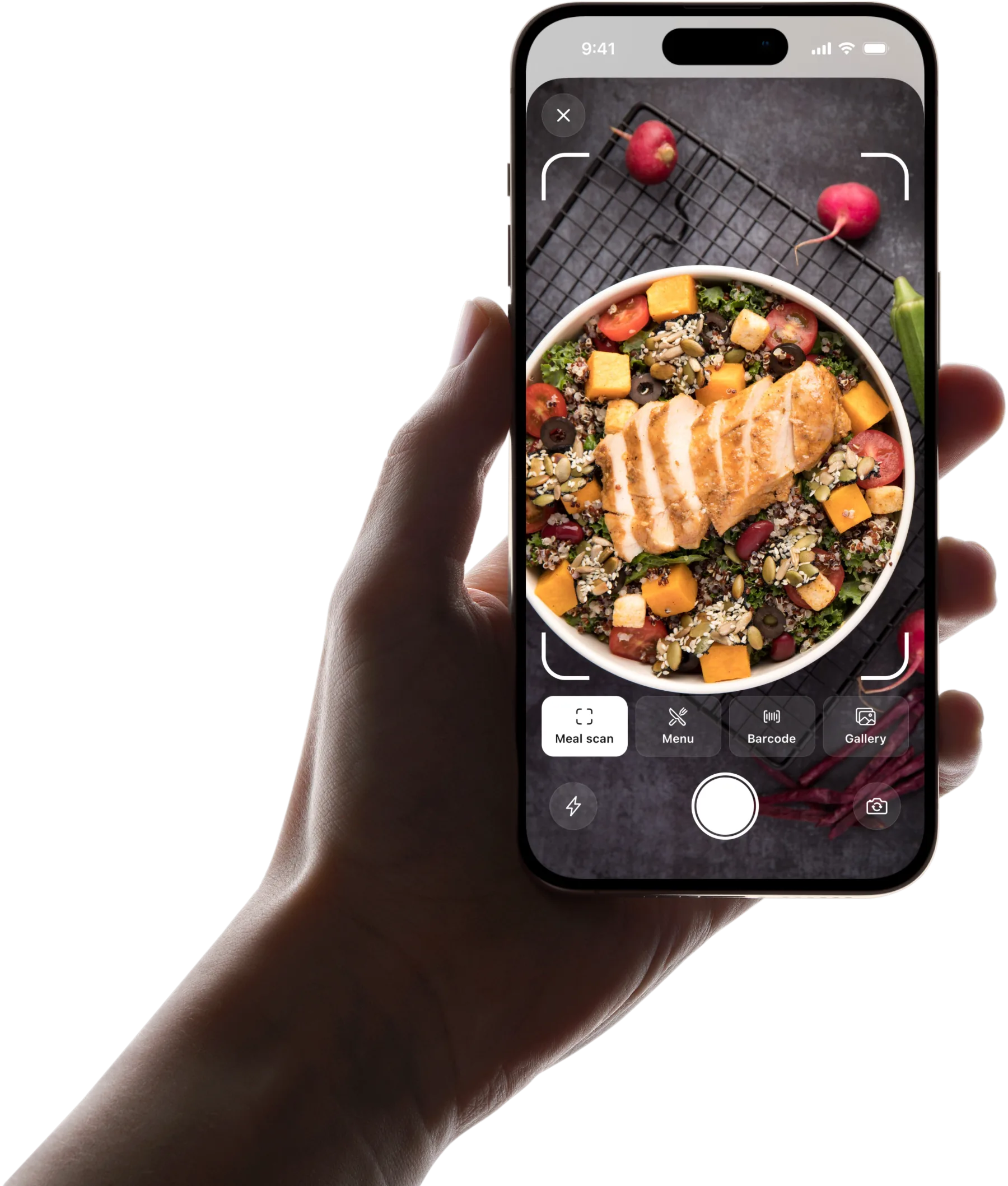
The fastest way to log food on a GLP-1 is to point your camera at it. Pep AI's AI food scanner reads a photo of your plate and fills in the meal with its protein, carbs, fat, fiber and calories, so a small lunch takes seconds to log instead of a search through a database. It can also scan a barcode, or a restaurant menu before you order. Photo, barcode and menu scans each show a GLP-1 score from 0 to 100: more protein and fiber score higher, and large, high-fat or carb-heavy meals score lower.
Eating on a GLP-1 is a different problem from ordinary dieting. Appetite is not the thing you are fighting any more. The risk flips: portions shrink so much that protein, fiber and fluid quietly fall short, and some days you can only manage a few bites before you feel full. That is why protein goals lead the day here, not calories.
Pep AI's food tracker is built around the small-portion reality. Snap a photo of a meal, scan a barcode or a restaurant menu, search the food database, or pull up something you ate recently in one tap. When you only need the numbers, quick log lets you enter macros directly. Protein and fiber sit at the top of the day, with water tracked alongside and reminders if you want them, because those are the three that slip first when appetite drops.
It also puts food in context. Your meals are logged in the same app as your doses, weight and side effects, and your food history marks shot days, so you can look back and see whether the heavy dinner came before the rough morning, or whether protein fell apart in the two days after shot day. A GLP-1 friendly section collects higher-protein shakes, bars, snacks and restaurant picks to make the next meal easier to plan.
Pep AI is a tracking tool, not a meal plan. Onboarding sets personalized daily targets that you can change at any time, and a clinician or dietitian can help set targets for your situation.
Five Ways to Log a Meal, Whatever the Day Looks Like
Every way below fills in the same day, and the numbers count toward the same goals. Nutrition values from scans are always estimates, not exact values.
Snap a Photo of the Plate
Point your camera at the meal and Pep AI fills in an estimate of protein, carbs, fat, fiber and calories, with the meal's GLP-1 score first on the result. A small lunch is logged in seconds instead of a database search.
The numbers are always estimates. If only half the plate gets eaten, log what you actually had.
Scan a Barcode
Packaged shakes, bars and snacks log straight from the barcode. The label's nutrition fills in without typing, with a GLP-1 score alongside.
It is the quickest route for the protein shake you have every morning. Recent foods keep it one tap away after that.
Search or Pick a Recent Food
Search the food database by name, or pull up something you ate recently in one tap. Repeat meals become the fastest entries in Pep AI.
On a GLP-1, many people settle into a short list of foods that sit well. Recents keeps that list close.
Quick-Add the Numbers
When you already know the macros, quick log lets you type them directly. It works well for a home recipe or a label you have in hand.
Nothing has to match a database entry. The totals count toward your goals all the same.
What a Logged Day Looks Like on a GLP-1
Morning: Start With Protein
A shake or eggs at breakfast goes in by barcode or recents, and the protein goal starts moving early. Pep AI shows right away how much of the day's target is left.
Starting strong takes pressure off the meals that follow. On low-appetite days, that head start matters.
Midday: A Photo Instead of a Search
Lunch is a quick photo, and Pep AI adds an estimate to the day.
Fiber sits right under protein, so a low number is easy to notice. There is still time to balance it later.
Evening: Eating Out Without Guessing
At a restaurant, a menu scan suggests a few best picks ranked by GLP-1 score before you order. The meal you choose goes into your log like any other.
Water gets a final check before bed. Optional reminders help when sipping through the day is easy to forget.
Spot the Meals That Do Not Sit Well
Side Effects Logged Beside Meals
Pep AI has built-in GLP-1 symptoms plus your own, each with the day and severity, in the same app as what you ate.
Symptom logging has its own page, the GLP-1 side effect tracker, with the full detail.
Patterns Across Shot Days
Over a few weeks, you can look back and see whether certain meals keep coming before a rough afternoon. Your food history marks shot days, so you can also see how eating changes in the days right after a shot.
That pattern is worth raising with your prescriber or dietitian. They can tell you what it means for you.
Notes for Your Next Appointment
Pep AI creates a PDF report of your doses, injection sites, weight and daily meal totals. Bring it along so the conversation starts from facts.
Food patterns you noticed in the app are easier to describe with your history open. Nothing has to be pieced together from memory.
How Pep AI Differs From a Calorie Counter
A calorie counter may suit people whose only goal is counting calories. On a GLP-1, the problem is usually different.
| Feature | Typical calorie counter | Pep AI |
|---|---|---|
| Headline number | Calories | Protein and fiber, with water alongside |
| GLP-1 doses and step-ups | Usually not tracked | Logged with dates and reminders |
| Side effects | Usually not tracked | Built-in list, plus your own |
| GLP-1 friendly picks | Rarely | Built in |
| PDF report for your prescriber | Varies | Built in |
Protein Leads, Not Calories
Calorie counters put one number at the top of the day. Pep AI puts protein and fiber first, with water alongside, because those are the three that slip when portions shrink.
Calories, carbs and fat are still there when you want them. They just do not run the show.
Doses and Food in One App
A calorie counter does not know when your shot day is or when your dose went up. Pep AI keeps both in the same app as every meal.
That link is what turns a food log into answers.
Higher-Protein Picks Built In
Pep AI includes a GLP-1 friendly section of higher-protein shakes, bars, snacks and restaurant options. It helps on days when cooking is not happening.
This list starts from the small-appetite problem rather than from calories.
What Pep AI Users Say About Food Logging
Photo Logging That Works
“The AI meal tracker does a great job when you take pics of meals.” That is how one Pep AI user described the photo logging.
A photo is less work than any search, which is why it keeps people logging past the first week.
Everything in One Calm Place
“I was overwhelmed … this just make it calm and easy to follow.” Another Pep AI user wrote that after leaving paper behind.
Food, doses and side effects share one app. 4.7 stars from 4,000+ App Store ratings.
Built for eating less, not for counting harder
The hard part of food on a GLP-1 is getting enough of the right things into smaller meals. Everything here is aimed at that.
Log a meal in seconds
Photo scan, barcode scan, restaurant menu scan, database search, recent foods, or quick-add macros when you already know the numbers.
Protein first
Your protein goal leads the day, so you can see early whether the next meal needs to carry more of it.
Fiber and water
Fiber and water sit next to protein, with optional water reminders, because constipation and dehydration are both easier to prevent than fix.
GLP-1 friendly picks
A browsable list of higher-protein shakes, bars, snacks, powders and restaurant options for days when cooking is not happening.
Food next to your doses
Meals, shots, symptoms and weight are logged in one app, and your food history marks shot days, so patterns show up without reconstructing the week.
Weekly summary
A week view of what you actually ate, which is usually more useful than any single day on a medication that changes appetite day to day.
Frequently asked questions
What should I track when eating on a GLP-1?+
Protein, fiber and water are the three most worth tracking, because they are the ones most likely to fall short when portions shrink. Calories matter less than you might expect, since the medication already reduces intake. Pep AI puts protein and fiber at the top of each day with water alongside.
Can Pep AI scan my food?+
Yes. You can log a meal from a photo, scan a packaged food's barcode, scan a restaurant menu, search the food database, or re-log a recent food. Quick log lets you enter calories and macros directly.
Does the food tracker connect to my GLP-1 doses?+
Yes. Food, doses, weight and side effects are all recorded in one app, and your food history marks shot days, so you can compare how you ate on the days after a shot with how you ate later in the week.
How accurate are photo estimates?+
Photo logging gives an estimate of nutrition, not an exact measurement. Portion size and hidden ingredients can shift the numbers, so use barcode or quick log when you have the exact label, and treat all values as a guide rather than dietary advice.
How do I log a meal at a restaurant?+
Scan the menu before you order and Pep AI suggests the best few picks, ranked by GLP-1 score, with estimated protein, fiber and calories. Log the dish you choose, or snap a photo when it arrives.
Is this a diet plan?+
No. Pep AI records what you eat against your daily targets, which onboarding personalizes and you can change, and shows the pattern over time. It does not prescribe a diet. A clinician or registered dietitian can help set targets that fit your health and medication.
Is Pep AI free to try, and is it on Android?+
Pep AI is free to try: a free download and a 3-day free trial. After the trial, tracking needs a paid subscription, which you can cancel from your App Store or Google Play account. It is on the App Store and Google Play; on iPhone it can sync with Apple Health, and on Android with Health Connect.
Does Pep AI give medical advice?+
No. Pep AI is a tracking and education app, not a medical device. It records what you log and shows patterns; it does not diagnose, set medical targets or change your treatment. Decisions about your medication stay with your prescriber.
Start tracking smarter today.
Free to try on iPhone and Android.