
GLP-1 Injection Tracker with Shot Reminders
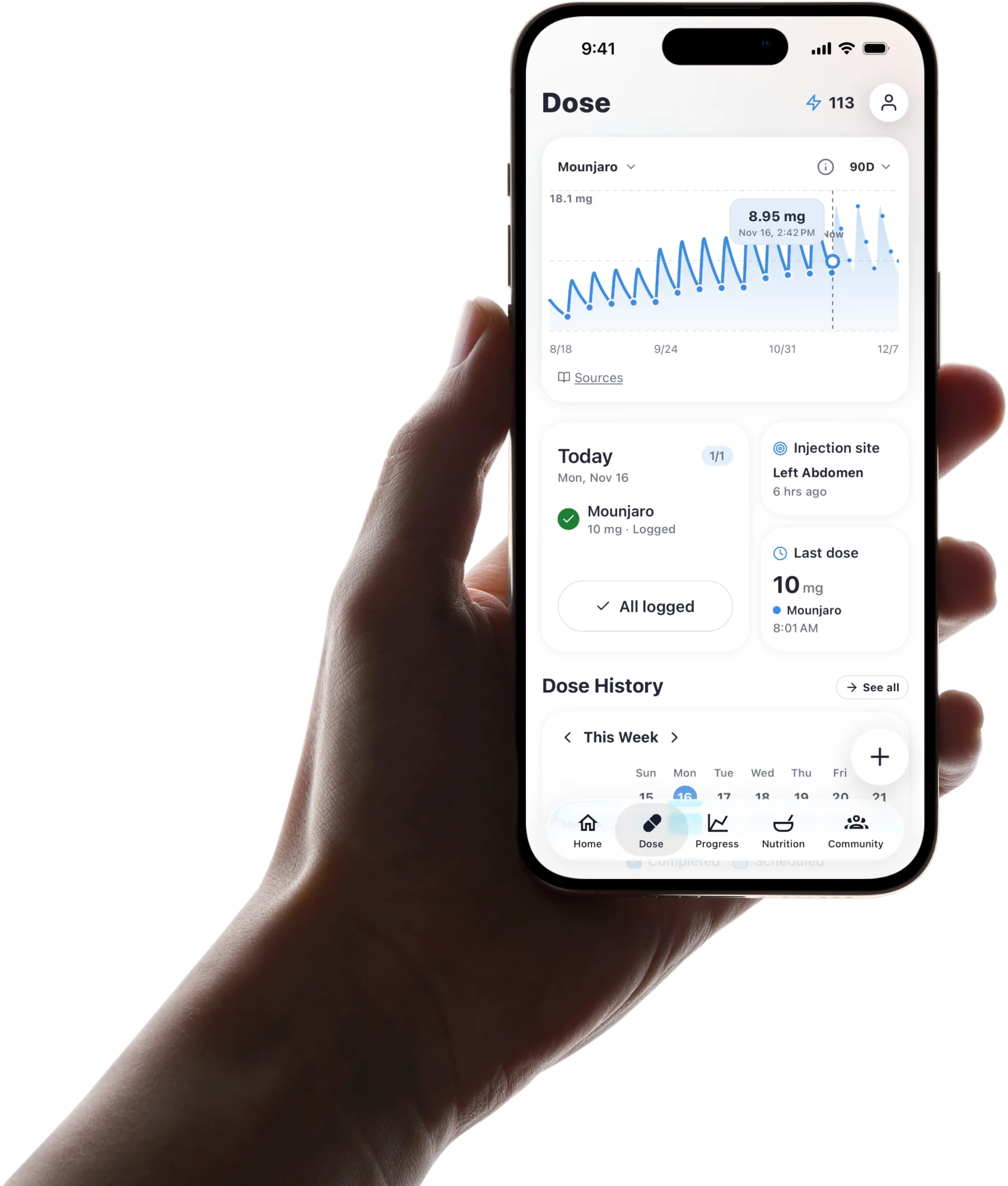
A reminder on shot day, a couple of taps to log it, and a schedule that keeps itself.


Published by Pep AI · GLP-1 tracker · Updated November 2026
The hardest part of a weekly shot is remembering the day. Seven days is long enough to lose track, especially after travel, a late shot or a schedule change. Pep AI holds the schedule for you: set it once as weekly, daily or your own interval, get a reminder when the shot is due, and log it in a couple of taps when you take it.
Once the scheduled time passes with nothing logged, the app marks the shot as overdue, so a missed week is something you see that day rather than discover later. Late or moved shots are recorded with their real date, which keeps the schedule and your history honest.
Pep AI records each shot with its site on a body map, which matters more on a long-term weekly medication than it first appears — a few hundred injections into a small number of areas is exactly how absorption becomes unpredictable years in.
It also keeps how you felt in the same app, dated next to your shots. Symptom recall is systematically distorted, and five minutes at an appointment is not enough to describe eight weeks. A dated log is.
From Schedule to Reminder to Logged Shot
Shot day takes four small steps, and Pep AI handles the remembering. It never suggests a dose or tells you when to take a missed one.
Set Your Interval Once
Pick weekly, daily or your own interval, then choose the day and time that match the schedule your prescriber gave you. Pep AI holds that schedule from then on.
There is no calendar event to copy each week. The next shot day is always worked out for you.
See the Reminder Where You Already Look
On shot day, Pep AI sends the reminder at the time you chose, so it is on your Lock Screen even if you have not opened the app in days.
Each medication can have its own reminder time. A morning shot and an evening pill never compete for the same alert.
Log the Shot in a Couple of Taps
Once the shot is done, open Pep AI and log it in a couple of taps. The date, dose and site are saved together, and the countdown to the next shot day starts again.
On iPhone (iOS 17 or later), a Live Activity on your Lock Screen counts down to the next dose and has a Log button that records it in one tap. On Android, the reminder opens the app to log.
Spot a Missed Shot the Same Day
Once the scheduled time passes with nothing logged, Pep AI marks that shot as overdue. You see it that day rather than a week later.
What to do about a late or missed shot is a question for your label's missed-dose instructions and your prescriber. Pep AI just makes sure you notice.
Scheduling for Weeks That Do Not Go to Plan
Real weeks break schedules. These options keep the record straight without Pep AI ever making the call for you. Skipping is always your prescriber's decision.
A Reminder Time for Each Medication
Pep AI keeps a separate schedule and reminder time for every medication you log. A weekly shot and a daily pill each get their own alert.
Change one and the others stay as they are. Each timetable runs on its own.
Skip and As-Needed Options
When your prescriber tells you to pause or skip a dose, mark it as skipped instead of leaving a gap. For a medicine your prescriber has you take only when needed, the as-needed option has no fixed day and no reminders.
Your history shows exactly what happened. Pep AI never decides to skip a dose for you.
When Travel Moves Shot Day
Pep AI saves each shot with the date you took it, so a dose taken on the road still lands in the right week. Moved shot days stay visible in your history.
If travel puts your schedule in doubt, check your label and ask your prescriber before shot day. The traveling with a GLP-1 guide covers packing and storage.
Shot Day on Your Lock Screen, Widget and Watch
The reminder reaches more than one screen. Widgets and the Apple Watch app are iPhone only; reminders work on iPhone and Android.
Lock Screen Reminders and the Live Activity
Shot-day reminders appear on your Lock Screen at the time you set, so there is nothing to dig through to find out what is due.
On iPhone (iOS 17 or later), a Live Activity counts down to the next dose on the Lock Screen and in the Dynamic Island, shows “Dose due” once the time has passed, and has a Log button that records the dose in one tap. On Android, the reminder opens the app to log.
Home-Screen Widgets on iPhone
A Pep AI widget shows your next dose at a glance. The medium size adds today's protein and water, and the large size adds a Mark Done button.
You know where the week stands before you even open the app.
Apple Watch
Pep AI has an Apple Watch app, so your next dose is on your wrist and you can log it there. On iOS 18 and later, the Live Activity also shows in the watch's Smart Stack.
The watch is simply another place to check. Your phone shows the same schedule.
iPhone and Android
Pep AI is on the App Store and Google Play, and shot-day reminders work on both. Ozempic®, Wegovy®, Mounjaro® and Zepbound® schedules all run the same way.
Pick the phone you already use. Your reminder schedule is set up in a couple of minutes on either.
Keep Shot Day Steady Through Every Step-Up
Dose changes come from your prescriber only. Pep AI keeps the timing steady around them.
The Schedule Carries On After a Step-Up
When your prescriber moves you to a new dose, update it in Pep AI and your shot day stays where it was. Reminders keep firing without a fresh setup.
Each new dose is saved with the date it started, so your step-up history stays readable.
Switching Medications Without Starting Over
If your prescriber switches you from one GLP-1 to another, add the new medication with its own interval. Each medication keeps its own reminders, so the new schedule starts cleanly.
Your past shots stay in your history. Nothing is lost when the plan changes.
Every Shot You Logged, Ready to Look Back On
Each shot you log becomes an entry in your shot history, and the PDF report includes your dose history. The full history is covered on the injection tracker app page.
Site rotation has its own page, the injection site tracker. Both connect to the same shot day you schedule here.
No More Calendar Alarms and Sticky Notes
In a User's Own Words
“Since I’ve been using this app, I don’t have to write anything down in a calendar or reminder in a phone.” That is how one Pep AI user described the change in an App Store review.
Shot day lives in one app instead of a calendar, a sticky note and a memory. The schedule becomes the app's job.
Rated 4.7 Stars on the App Store
Pep AI is rated 4.7 from 4,000+ ratings on the App Store, and has passed 200,000+ downloads across iPhone and Android.
Pep AI is free to try: a free download and a 3-day free trial. After the trial, tracking needs a paid subscription, which you can cancel from your App Store or Google Play account.
Shot Day Beside Everything Else
Reminders sit in the same app as your meals, side effects and weight. When a shot day goes sideways, the rest of the week has context.
One app for all of it is what replaces the notes app and the spreadsheet too.
Sources
Shot day, handled
Fifty-plus shots a year. The schedule should be the app's job, not your memory's.
Your schedule, your interval
Weekly, daily or a custom interval. Move a shot day and the reminders follow, so the next one lands on the right day.
Shot reminders
Weekly, daily or your own schedule. A reminder on shot day, a couple of taps in the app to log it, and your history builds itself.
Injection site map
Log where each shot went on a body map across abdomen, thighs and arms, so the last site is never a guess.
Estimated medication level
See your estimated GLP-1 level rise and fall between shots, modelled from the injections you log and published half-lives. A model, not a blood test.
Protein & fiber
Log meals by photo, barcode or search with protein and fiber up front, the two that slip first when appetite drops.
Side effects & progress
Rate symptoms by severity and keep weight and progress photos in the same app as your shots.
Frequently asked questions
Where should I inject a GLP-1?+
The abdomen, thigh and upper arm are the usual sites on GLP-1 labels. The Mounjaro® and Zepbound® labels say the back of the upper arm should be injected by another person. Rotating sites matters more than which one you choose; follow your own label's Instructions for Use.
Can Pep AI remind me on shot day?+
Yes. Reminders follow whatever interval you set, and the app notices when a scheduled dose has not been logged.
Can I set a custom interval instead of weekly?+
Yes. Pep AI supports weekly, daily and custom intervals, so the reminder follows the schedule your prescriber set rather than a fixed pattern. Change the interval at any time and the next reminder moves with it. Past shots keep their real dates.
What happens if shot day passes without a log?+
Once the scheduled time passes, Pep AI marks the shot as overdue, so you notice the same day instead of finding out later. If you took it and forgot to log it, add it with the real date. For what to do about a missed or late shot, follow your label's missed-dose instructions and contact your prescriber. Pep AI does not give dosing instructions.
Can I get shot reminders on Apple Watch?+
Yes, with an iPhone. Pep AI has an Apple Watch app and home-screen widgets, so your next shot is visible without opening the app, and on iOS 17 or later a Live Activity on the Lock Screen has a Log button. Widgets and the Watch app are iPhone only; reminders work on Android too.
Can I set reminders for two medications?+
Yes. Each medication in Pep AI has its own schedule and reminder time, whether it is a weekly shot or a daily pill. That keeps a GLP-1 injection tracker and a pill reminder in one app rather than two. Each medication's history stays separate and easy to read.
Does Pep AI give medical advice?+
No. Pep AI is a tracking and organization tool, not a medical device. It does not recommend medications, doses or schedules, and Pep Bot declines dosing questions. What to take stays between you and your prescriber.
Start tracking smarter today.
Free to try on iPhone and Android.