
Mounjaro® Half Life Calculator for Weekly Shots
See What Is Left of Each Mounjaro® Shot, Day by Day
Enter the day of each recent Mounjaro® shot and the amount on your prescription label, and the estimate shows how each shot may build and taper until your next one. It uses the elimination half-life of about 5 days printed on the Mounjaro® FDA label. Everything is calculated on your device, with no account and nothing sent to Pep AI. It is an estimate for learning, never a dosing or timing recommendation.
Half-life about 5 days (Mounjaro® label). On the chart, each shot peaks about 36 hours after it is taken.
Your doses
Day of each shot (day 1 is your first entry) and the amount. Use your own unit; the chart is relative, so the shape is what matters.
Calculated on your device. Nothing you enter is stored, added to the web address or sent to Pep AI.
Estimated peak
At the end of the chart
Doses plotted
4
Longest gap between doses
7 days
Below 10% of peak
18 days after last dose
An estimate only, not a lab value and not dosing advice. Mounjaro® is a trademark of Eli Lilly; Pep AI is not affiliated with or endorsed by Eli Lilly.
The default rows are relative amounts of 1, so the chart shows a shape, not a real dose. Replace them with your own shots.
How Long Mounjaro® Lasts After a Shot
In short: about a 5 day half-life and a peak 8 to 72 hours after a shot (label facts), steady state after about 4 weeks of weekly shots (label fact), and mostly cleared about 25 days after the peak (the five half-lives rule of thumb, not a label figure).
Half-Life: About 5 Days
Label fact. Mounjaro® contains tirzepatide, and its FDA label (revised August 2026) gives an elimination half-life of approximately 5 days. The label says this is what enables once-weekly dosing.
Roughly half of a shot is still in circulation about five days after its peak. By the next weekly shot, a bit less than half remains (about 47% on the chart).
Peak: 8 to 72 Hours After a Shot
Label fact. According to the Mounjaro® label, the time to maximum concentration ranges from 8 to 72 hours after a shot. The chart's curve peaks about 36 hours after each shot, inside that range.
Steady State: About 4 Weeks
Label fact. The label says steady-state tirzepatide levels were reached after 4 weeks of once-weekly dosing. Before that, each weekly shot adds to what is left from the last one.
After that point, each week rises and eases in a similar wave. The chart draws that wave from the shots you enter.
Mostly Cleared in About 25 Days
Rule of thumb. The Mounjaro® label does not give a separate clearance time, but a general rule is that a medicine is mostly gone after about five half-lives. For a 5 day half-life, that works out to about 25 days after the peak (roughly 26 to 27 days after the shot).
Treat that as a rule of thumb, not a personal timeline. Your prescriber can tell you what it means for you.
Source: Mounjaro® prescribing information, revised August 2026.
How the Estimate Is Calculated
Formula: each shot rises to an estimated peak about 36 hours after it is taken. After the peak, what is left is the amount entered × 0.5 ^ (days since the peak ÷ 5). Worked example with an amount of 1, as Pep AI's calculators use: at the peak, 36 hours after the shot, the estimate is 1, and 5 days after the peak 1 × 0.5 ^ (5 ÷ 5) = 0.5 remains.
| Days after the peak | Share of one shot left |
|---|---|
| 5 | 50% |
| 10 | 25% |
| 15 | 12.5% |
| 20 | about 6% |
| 25 | about 3% |
One Formula for Every Shot
Each shot rises to an estimated peak about 36 hours after it is taken, then halves every 5 days. After the peak, what is left is the amount entered × 0.5 ^ (days since the peak ÷ 5). The estimate adds up what is left from every shot on the list.
After the peak, a phone calculator can check any day on the chart. Nothing about the method is hidden.
A Single Shot, Five Days at a Time
Counting the days from the peak, not from the shot: 5 days after the peak, about 50% remains, 10 days after the peak about 25% and 15 days after the peak about 12.5%. By 25 days after the peak, only about 3% of that shot is left.
The table above shows those steps, so the taper is easy to read. It works the same way whatever amount is entered.
What to Enter
Enter the day you took each Mounjaro® shot (day 1 is the first one you enter) and the amount printed on your prescription label. A few weeks of real shots give a more realistic picture of how shots stack.
Leave out anything you are unsure about rather than guessing. The estimate is only as good as what is entered.
Your Entries Stay on Your Device
Every calculation runs in your browser. Days and amounts are never added to the web address, stored or sent to Pep AI.
Close the tab and the entries are gone. There is no sign-up and no email required.
Last updated November 2026. Half-life from the Mounjaro® prescribing information, revised August 2026.
Your Weekly Mounjaro® Pattern, Explained
Example: the first five weekly Mounjaro® shots, each a relative amount of 1 (estimated). The chart shows math, not symptoms or effects.
The Mounjaro® label says steady-state tirzepatide levels were reached after 4 weeks of once-weekly dosing.
Less Carries Over Than People Expect
With a 5 day half-life and a 7 day gap between shots, a little less than half of each Mounjaro® shot is left when the next one is due. The chart still climbs for the first few weeks, then settles.
That settling lines up with the 4 weeks the label gives for steady state. After that, the weekly wave looks similar from one week to the next.
The Lowest Point Is Right Before Shot Day
Each week, the estimate is lowest just before the next Mounjaro® shot and highest a day or two after it. The calculator never suggests changing your schedule.
If the pattern bothers you, talk to your prescriber. Your shot day stays the one your prescriber set.
Step-Ups Build a New Baseline
When your prescriber moves you to a higher Mounjaro® dose, enter the new amount from that day on. The chart shows the earlier amount tapering while the new one builds over the next few weeks.
This is a picture of the math, not a prediction of how you will feel. Your step-up plan comes from your label and your prescriber.
After a Final Shot
Example: one last Mounjaro® shot of 1 tapering to near zero about 25 days after its peak (estimated).
Enter a last shot and the chart keeps going after it (choose how long under “Show after the last dose”), until the estimate is close to zero, about 25 days after its peak by the five half-lives rule. It shows why stopping is a taper rather than a switch.
Questions about stopping or pausing belong with your prescriber. Bring the chart to that conversation.
What the Estimate Can and Cannot Tell You
It Is Not a Blood Test
The result is an estimated amount remaining, built only from the days and amounts entered. It is not a measured level in your blood. Absorption, body weight and other factors vary from person to person, and the estimate does not model them.
It Never Suggests a Dose or a Time
This page never recommends a dose, a dose change or the timing of your next shot. Those decisions belong with your prescriber. If a Mounjaro® shot was late or missed, check your label and contact your prescriber or pharmacist.
It Uses One Published Number
The half-life comes from the Mounjaro® prescribing information, and the source is listed on this page. When the label is updated, the page is updated and the date on it changes.
The Mounjaro® label carries a boxed warning about the risk of thyroid C-cell tumors. Read it, and the rest of the label, with your prescriber. Mounjaro® is a trademark of Eli Lilly, and Pep AI is not affiliated with or endorsed by Eli Lilly. Read the Mounjaro® FDA label.
Track Every Mounjaro® Shot in Pep AI
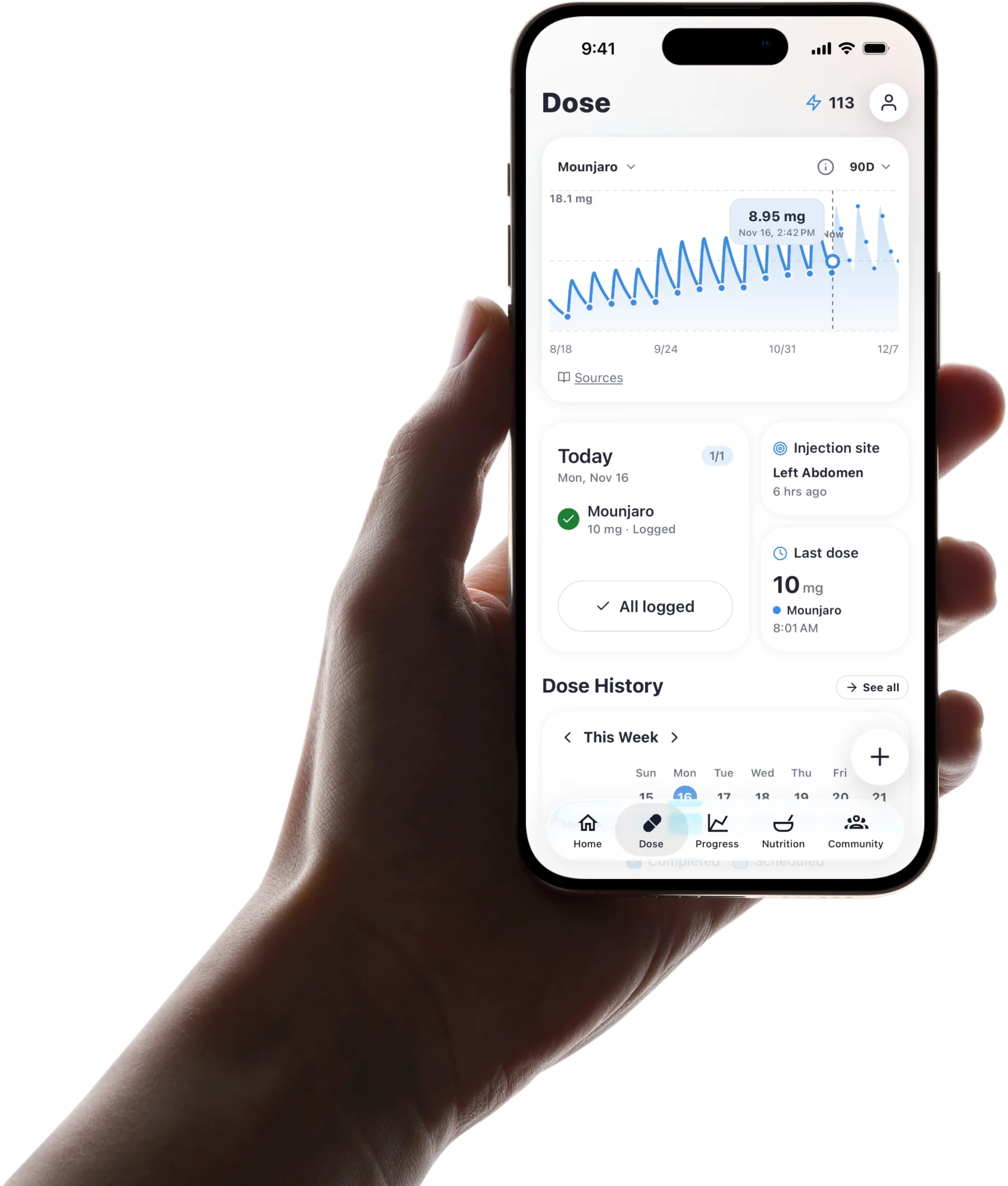 The Dose tab in Pep AI for Mounjaro®: the estimated level chart from logged shots, the last injection site and the last dose.
Every Shot on Its Weekly Schedule
Pep AI logs each Mounjaro® shot with its weekly schedule, timing and history in one place. Your step-ups are entered once, exactly as your prescriber set them.
Pep AI never suggests a dose. It keeps the record so you do not have to remember it.
An Estimated Level From Your Own Log
The same half-life idea runs inside Pep AI, drawn from the shots you actually log. On the Dose tab, the estimated level chart shows whether it is rising or easing off between shot days, and it updates every time a shot is logged. It is an estimate, not a lab value.
Reminders on Your Lock Screen and Wrist
Pep AI sends a shot-day reminder at the time you choose, and tapping it opens the log for that shot. On iPhone, a Live Activity on the Lock Screen counts down to your next Mounjaro® shot with a one-tap Log button, the large Next Dose widget has a Log button too (iOS 17 or later), and the Apple Watch app can log a shot from your wrist. Widgets and the Apple Watch app are iPhone only.
Injection Sites on a Body Map
Pep AI records where each shot went on an interactive body map. The map marks your last site, lists your recent sites and warns you if you pick the same spot again, which also makes a sore spot easy to mention at your next appointment.
Food and Shots in One App
Log a Meal in Seconds
Pep AI logs food by photo, menu scan, barcode, search or quick log, or you can tell Pep Bot, the in-app assistant, what you ate by typing or speaking. Each meal shows estimated calories, protein, carbs, fat and fiber.
Meals and shots are both logged in Pep AI, so you can check one against the other. That makes it easier to notice which days a smaller plate is all that fits.
Protein, Fiber and Water First
Pep AI shows your protein, fiber and water goals for each day, built for eating less rather than counting harder. Small portions still add up when each one is visible.
Patterns Worth Bringing Up
Meals, shots and side effects are all logged in Pep AI, so you can look back at the days after a shot. Your prescriber or dietitian can tell you what any pattern means for you.
In One User's Words
“I was overwhelmed … this just make it calm and easy to follow. Plus love the food section” That is how one Pep AI user described it in an App Store review.
Sources
Frequently asked questions
Track this automatically with Pep AI.
Pep AI draws this estimated curve from every Mounjaro® shot you log, reminds you on shot day and keeps food and side effects in the same app. It is free to try with a free download and a 3-day free trial, then a subscription.


This tool is for general information and education only and is not medical advice. It does not recommend a dose or a schedule. Talk to your prescriber about your medication and any change to it.
Built by the Pep AI team.