
Zepbound® App & Tracker
Shot day, sites, titration and how the week actually went.


Published by Pep AI · GLP-1 tracker · Updated November 2026
Zepbound® is tirzepatide, and its roughly five-day half-life against a seven-day interval is why many people describe the back half of the week feeling different from the first couple of days. Seeing that pattern requires the doses and the symptoms against the same dates.
Pep AI puts them there. Shot day, injection site, titration changes, weight, food and how you felt are all dated in one app, so 'the third week was worse' becomes a checkable observation rather than an impression.
Protein tracking is part of it too, because it is the nutrient most likely to fall short when intake drops sharply — and the one that most affects how much of the weight loss comes from lean tissue.
Zepbound® Dose Steps on the FDA Label
These are the label's own steps, quoted so you can see where they come from. They are not a plan for you: which dose you take, and when, is set by your prescriber. Pep AI never suggests a dose.
| Label step | What the Zepbound® label says |
|---|---|
| Start | 2.5 mg once a week for 4 weeks, then 5 mg. 2.5 mg is a starting dose, not a maintenance dose |
| Increases | 2.5 mg steps, after at least 4 weeks on the current dose |
| Maintenance, weight reduction | 5 mg, 10 mg or 15 mg once a week |
| Maintenance, obstructive sleep apnea | 10 mg or 15 mg once a week |
| Highest dose | 15 mg once a week |
Four Weeks at 2.5 mg to Start
The Zepbound® FDA label (revised August 2026) starts at 2.5 mg once a week for 4 weeks, then moves to 5 mg. The label is clear that 2.5 mg is a starting dose, not a maintenance dose.
Pep AI logs those first four shots with their dates. The start of your titration is on the record from day one.
Increases of 2.5 mg, at Least 4 Weeks Apart
After 5 mg, the label allows increases in 2.5 mg steps after at least 4 weeks on the current dose. For weight reduction, it lists 5 mg, 10 mg or 15 mg as maintenance doses, with 15 mg as the highest.
Which dose you stay on is decided by you and your prescriber, based on your label and how you are doing. Pep AI records the dose you are given and never suggests one.
Each Step Saved With Its Date
Pep AI stores every new dose with its start date, and your weight chart sits in the same app, so comparing the trend with each step is quick.
That view is useful at appointments where the dose is discussed. Pep AI gives you the dates and leaves the decisions to your prescriber.
Watch the Trend, Not the Daily Number
A Trend Line That Smooths Out the Noise
Daily weigh-ins bounce around, so Pep AI lets you read your weight as a trend across 30 days, 90 days, a year or all time. One heavy morning stops feeling like a setback.
Your dose history is in the same app, with each step dated, so you can see how the trend moved at each stage of your plan.
Progress Photos Beside the Numbers
Add progress photos in Pep AI and keep them with your weight history. Changes the scale misses are easier to see.
Photos stay inside the app with the rest of your record. You choose what to add and when.
Weight and Steps Sync Automatically
On iPhone, Pep AI syncs weight and steps with Apple Health, and on Android it connects with Health Connect. Fewer numbers need to be typed by hand.
Achievements mark consistency milestones along the way. Pep AI celebrates steady logging, not a number on a single day.
Protein, Fiber and Water on Smaller Plates
Five Ways to Log a Meal
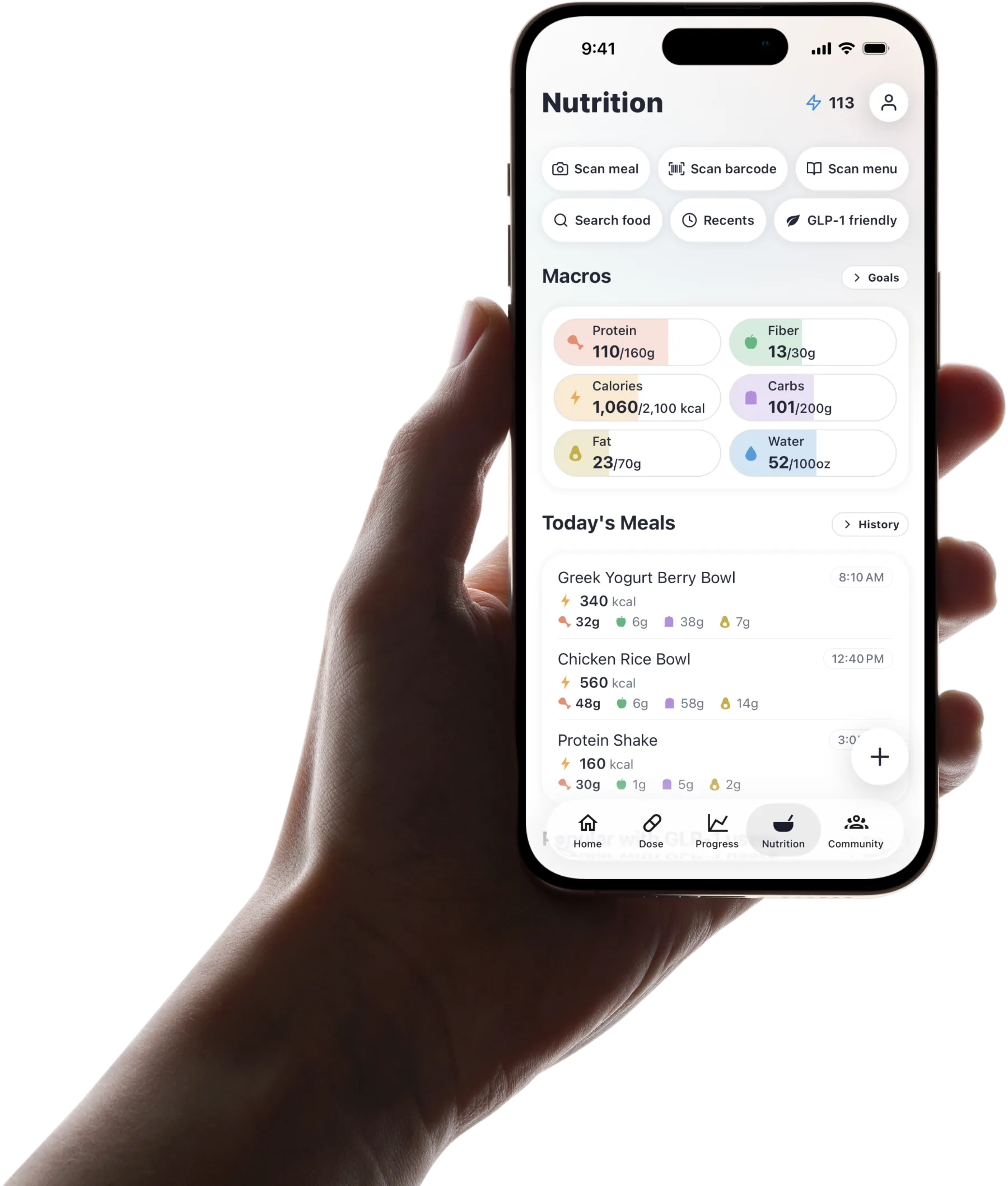
Snap a photo, scan a barcode or a menu, search or pick a recent food, or quick-log the numbers. Pep AI estimates calories, protein, carbs, fat and fiber for each meal.
Small meals take a few seconds to log. Pep AI keeps protein and fiber at the top of the day's view.
A Water Goal You Can See
Pep AI tracks water alongside protein and fiber, each with its own daily goal. A quick tap adds a glass.
Hydration is easy to forget when you eat and drink less. Optional water reminders help.
GLP-1-Friendly Picks When You Need Ideas
Pep AI lists higher-protein shakes, bars, snacks and restaurant options in one section. It helps on days when nothing sounds good.
Each pick can go straight into your food log. Nutrition values in Pep AI are estimates, not dietary advice.
Sleep, Energy and Mood Between Shots
A Check-In That Takes Seconds
Each day, Pep AI asks for a quick rating of energy and mood. It takes a couple of taps and builds a picture of your week.
Over time those ratings show which days tend to feel harder, and Pep AI points out when mood or energy shifts around shot day.
Sleep Logged by Hours and Quality
Pep AI records how long you slept and how well. Rough nights become visible next to the rest of your log.
Pep AI is a tracking tool, not a sleep test. Any sleep concerns belong with your prescriber.
Side Effects in the Same Place
The Zepbound® label lists nausea, diarrhea, vomiting, constipation and fatigue among its most common side effects. Pep AI has built-in GLP-1 symptoms plus your own, each with the day and severity. All five of those are built in.
Because check-ins and side effects are dated in one app, patterns stand out. Pep AI turns a vague bad week into dates you can show.
Made for Every Stage of Zepbound®
Pep AI does not give medical advice. It keeps the record for each stage.
Your First Month
New to weekly shots? Pep AI sets reminders, records injection sites and logs early side effects so the first weeks feel organized.
Everything starts from the dose and day your prescriber set. Pep AI builds the history from there.
Moving Through Step-Ups
Each new dose is saved with its start date, so comparing the weeks before and after is easy.
That comparison is useful to share with your prescriber. The decision about the next step stays with them.
Settled on a Maintenance Dose
Long stretches on one dose are where the trend matters most. Pep AI keeps weight, protein and check-ins steady in the background.
When progress slows, the record shows what changed and what did not. Pep AI makes that conversation easier.
Before an Appointment
Pep AI turns your doses, injection sites, weight and daily meal totals into a PDF report you can email ahead or open on your phone at the visit.
No notebook to dig through. The report is ready whenever you need it.
Sources
Everything against the same dates
Patterns only appear when doses and outcomes share the same dates.
Side effect log
A consistent scale, saved by day beside your shot dates, so patterns are visible instead of reconstructed.
Shot reminders
Weekly, daily or your own schedule. A reminder on shot day, a couple of taps in the app to log it, and your history builds itself.
Injection site map
Log where each shot went on a body map across abdomen, thighs and arms, so the last site is never a guess.
Estimated medication level
See your estimated GLP-1 level rise and fall between shots, modelled from the injections you log and published half-lives. A model, not a blood test.
Protein & fiber
Log meals by photo, barcode or search with protein and fiber up front, the two that slip first when appetite drops.
Side effects & progress
Rate symptoms by severity and keep weight and progress photos in the same app as your shots.
Frequently asked questions
Is Zepbound® the same as Mounjaro®?+
Both are tirzepatide with the same pharmacokinetics. They differ in labelled indication, not in the molecule.
Can I track weight and food alongside my shots?+
Yes. Weight, food, protein and symptoms are all dated in the same app as your doses, which is what makes patterns visible.
Can I try Pep AI before paying?+
Yes. Pep AI is free to try, with a free download and a 3-day free trial to set up Zepbound® and log a few days. After the trial, tracking needs a paid subscription. You can cancel from your App Store or Google Play settings at any time.
Does Pep AI work with Zepbound® vials?+
Yes. The label lists Zepbound® in single-dose pens, single-dose vials and the KwikPen, and Pep AI logs the dose and date the same way for each. Pep AI never converts doses. Follow the Instructions for Use for your form and ask your prescriber or pharmacist.
Can the Zepbound® app pull weight from Apple Health?+
Yes. On iPhone, Pep AI syncs weight and steps with Apple Health, so readings from connected apps show up on your trend. On Android, Pep AI connects with Health Connect. You can always add a weigh-in by hand as well.
Does Pep AI give medical advice?+
No. Pep AI is a tracking and organization tool, not a medical device. It does not recommend medications, doses or schedules, and Pep Bot declines dosing questions. What to take stays between you and your prescriber.
Start tracking smarter today.
Free to try on iPhone and Android.