
The GLP-1 Progress Tracker App That Shows the Weeks, Not Just the Weigh-In
Weight trend, progress photos, daily check-ins and achievements in one place, so progress reads as a pattern across weeks.


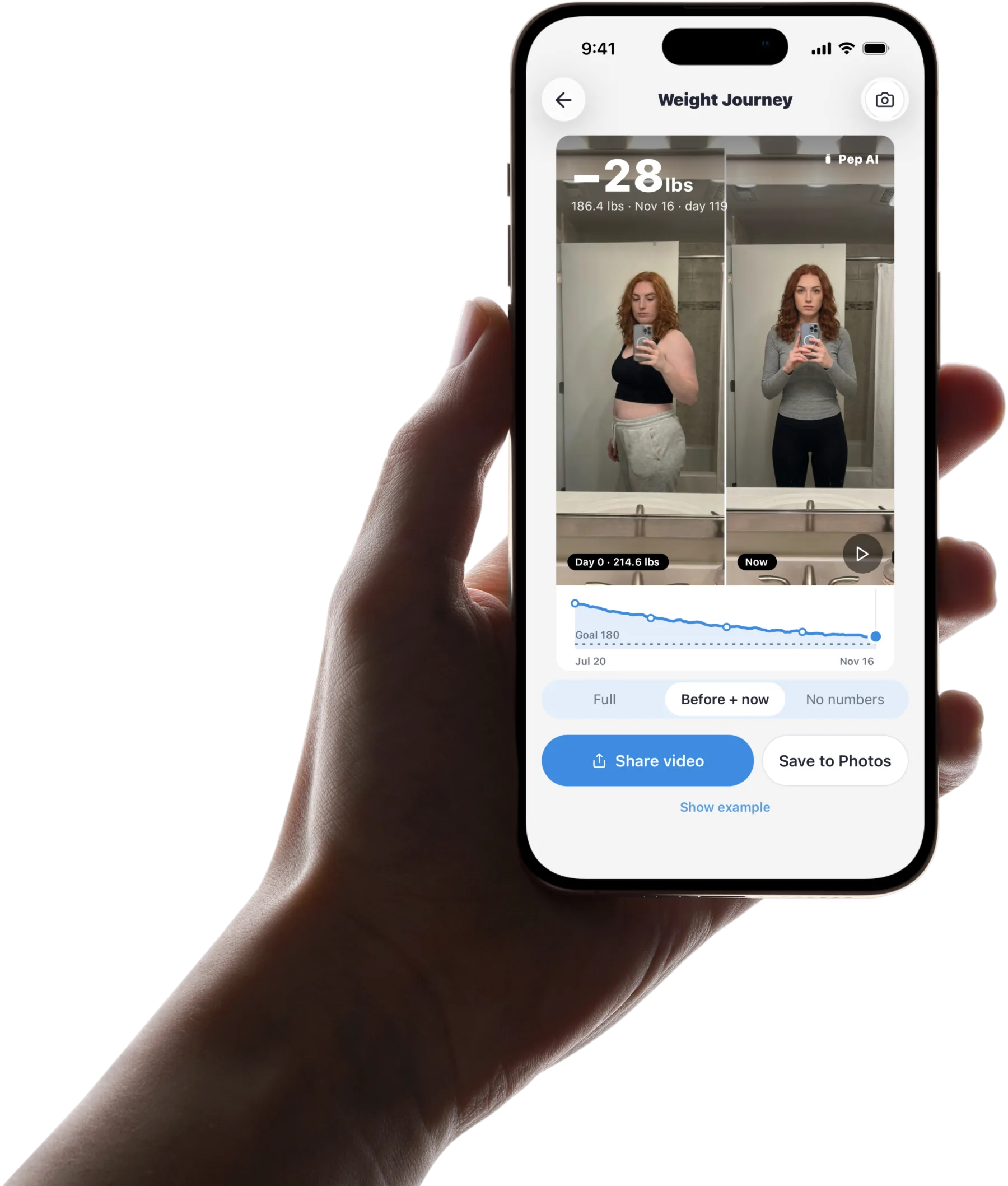
Published by Pep AI · GLP-1 progress tracker · Updated November 2026
Pep AI keeps your weight trend, progress photos, daily check-ins and achievements together, so progress reads as a pattern across weeks. A hard morning on the scale stays one data point instead of the whole story.
Your GLP-1 doses, meals and side effects are logged in the same app, so every change comes with context. This page is about photos, check-ins and achievements over the weeks; the weight chart itself has its own page.
Pep AI records what happened. Decisions about your treatment stay with you and your prescriber. It is free to try: a free download with a 3-day free trial, then a subscription for tracking.
Progress on a GLP-1 Is More Than One Number
Progress is the trend across weeks, plus the photos and how you feel. Any single morning on the scale says very little.
If the scale itself is your main focus, the weight loss tracker page covers the GLP-1-aware weight trend and scale sync in more depth.
Daily Weigh-Ins Move Around
Water, salt, a late meal and the time of day can all move the scale from one morning to the next. Pep AI shows your weight as a chart, so those swings read as noise rather than setbacks.
Reading the trend across several weeks is a calmer way to judge where things stand. The chart zooms from a week out to all time whenever you want the longer view.
Flat Weeks Are Common
Flat weeks are common. Look at the trend over several weeks, and talk to your prescriber if it worries you.
Pep AI keeps the rest of your record in view, so a flat stretch comes with the details around it.
Some Changes Never Show on a Scale
How your clothes fit, your energy and your sleep are worth tracking too. Pep AI gives them a place through progress photos and quick daily check-ins.
Looking at week one next to week twelve often tells a clearer story than any single weigh-in. That side-by-side view is easy to pull up whenever motivation dips.
Set Up Your Progress View in a Few Minutes
The work is front-loaded. After setup, the daily habit takes seconds.
Enter Your Starting Point and Goal
Add your starting weight and a goal weight. During setup, Pep AI also builds personalized daily nutrition targets and shows the date you could reach your goal at the pace you pick. You can change any of it, and your prescriber is the right person to talk to about what goal fits you.
Everything after this builds on that first entry, and the chart starts filling in from day one.
Connect Apple Health or Health Connect
Turn on the health sync once and Pep AI pulls in weight and steps on its own. It works with Apple Health on iPhone and Health Connect on Android.
Skip this step if you would rather log by hand. Both ways feed the same chart.
Take a First Progress Photo
Pick a spot with steady light and take a first photo in Pep AI. Future photos in the same place make the comparison easy.
Repeat it every few weeks or whenever you like. The photo history builds quietly in the background.
Check In Once a Day
A daily check-in takes seconds and covers energy, mood and sleep. Doses, meals and side effects are logged in the same app.
After a few weeks, the charts start to show a pattern. That is when progress becomes easy to see.
See What Was Going On Behind Every Change
A progress chart alone cannot explain a stall or a good month. Because your doses, meals and side effects are in the same app, the explanation is usually a few taps away.
The Weeks Around a Step-Up
Your dose history keeps every dose with its date, so you can compare the weeks around a new dose with your weight and check-ins.
That is a useful starting point for your next appointment. Your prescriber decides what any pattern means for your treatment.
Protein on Low-Appetite Days
Meals logged by photo, barcode, menu scan or search sit in the same app as your weight, so a week of low protein is easy to find when the chart goes flat. The GLP-1 food tracker page covers the nutrition side.
A Rough Side Effect Week
Nausea or fatigue logged in Pep AI keeps its date, so a week that felt hard can be compared with your weight and mood.
Pep AI has a built-in list of GLP-1 symptoms, plus your own. Each entry records the day and severity.
Late or Missed Shots
Every logged dose has a date, and a scheduled dose that was not logged shows as overdue once its time passes. Seeing a gap in your dose history beats trying to remember what happened three weeks ago.
Questions about a late or missed shot belong with your label and your prescriber. Pep AI keeps the record and never tells you what to take.
Take Your Progress to Your Next Appointment
A PDF Report From Your First Entry
Pep AI turns your logged weight, doses, injection sites and daily meal totals into a PDF report from your first entry to today. Share it before or during your appointment.
Nothing has to be retyped from notes.
Answers Ready for the Usual Questions
How has your weight moved since the last step-up, and how have the side effects been? With Pep AI, the answers are already on the page.
That leaves more of the appointment for the questions that matter to you. Your clinician makes any decisions about your treatment.
Real Users Rely on the Export
“Awesome you can export a report of all that data.” That is how one Pep AI user put it in an App Store review.
The export is built into Pep AI and ready whenever an appointment comes up. The record keeps growing between visits.
Trusted by GLP-1 Users on iPhone and Android
4.7 Stars From 4,000+ App Store Ratings
Pep AI is rated 4.7 from 4,000+ ratings on the App Store, and it has passed 200,000+ downloads across iPhone and Android.
Those numbers come from people tracking shots, meals and progress every week.
No More Notebooks and Phone Reminders
“Since I’ve been using this app, I don’t have to write anything down in a calendar or reminder in a phone.” That is how one Pep AI user described the switch.
Progress tracking works the same way in Pep AI. The record builds as you log, without a spreadsheet on the side.
Works With FDA-Approved GLP-1s
Pep AI tracks Ozempic®, Wegovy®, Mounjaro®, Zepbound®, Rybelsus® and Foundayo™, shots or pills. Progress tracking works the same whichever one you take.
Pep AI is not affiliated with or endorsed by Novo Nordisk or Eli Lilly. Brand names are trademarks of their respective owners.
Everything Pep AI Tracks to Show Your Progress
Each of these is a real screen in the app, not a promise.
A weight chart with your goal
Every weigh-in on a chart you can view from a week to all time, with your goal weight on it, so you can see how far you have come and what is left.
Progress photos
Photos kept with your weight history and easy to compare, for the changes the scale misses. Same spot, same light keeps it fair.
Daily check-ins
Energy, mood and how you slept in a quick check-in. Sleep hours can sync from Apple Health or Health Connect. Over a few weeks, the entries show whether the days are getting easier.
Achievements
Achievements and levels mark consistent logging, so a slow week on the scale can still be a good week for the habit.
Automatic weigh-ins
Weight and steps from Apple Health on iPhone or Health Connect on Android. Or add a weigh-in by hand in a couple of taps.
Doses and symptoms in context
Your dose history and side-effect log sit in the same app, so a flat stretch or a good month comes with its reasons.
Frequently asked questions
What Does a GLP-1 Progress Tracker App Track?+
In Pep AI, progress means your weight trend, progress photos, daily check-ins for energy, mood and sleep, and achievements for consistency. Your doses, meals and side effects are logged in the same app, so you can see what surrounded each change over the weeks.
Is Pep AI Free to Try?+
Pep AI is free to try. The download is free and comes with a 3-day free trial, so you can set up your goal, log a few days and see whether it fits. After the trial, tracking needs a paid subscription. Cancel at least 24 hours before the trial ends and you are not charged; the App Store or Google Play shows the exact date.
Will Pep AI Tell Me How Much Weight to Lose?+
No. Pep AI is a tracking and education app, not a weight loss program or a medical device. You choose your goal weight; setup builds personalized daily nutrition targets and shows a goal date at the pace you pick, and you can change all of it. Treatment decisions stay with you and your prescriber.
Do I Need to Weigh Myself Every Day?+
No. Weigh as often as you will do it consistently, whether that is daily or once a week at the same time. Pep AI shows the trend either way, and photos and check-ins fill in the progress the scale does not show.
Does Pep AI Sync With Apple Health or Health Connect?+
Yes. Pep AI can read weight and steps from Apple Health on iPhone and Health Connect on Android. If your smart scale writes weight to either one, your weigh-ins appear in the app automatically, and you can still log by hand any time.
What Should I Do If My Progress Stalls?+
Flat weeks are common, so look at the trend over several weeks before judging it. If it lasts or worries you, bring your Pep AI report to your prescriber, who can review the full picture and decide whether anything should change.
Can I Use the GLP-1 Progress Tracker App on Android?+
Yes. Pep AI is on the App Store and Google Play with the same progress tracking on both. Your weight chart, photos, check-ins and achievements work the same way on iPhone and Android phones.
Start tracking smarter today.
Free to try on iPhone and Android.