
The GLP-1 Score: One Number for Comparing Meals
Pep AI gives meals a GLP-1 score from 0 to 100, worked out from their estimated nutrition and your daily calorie goal. More protein and fiber for the calories score higher.


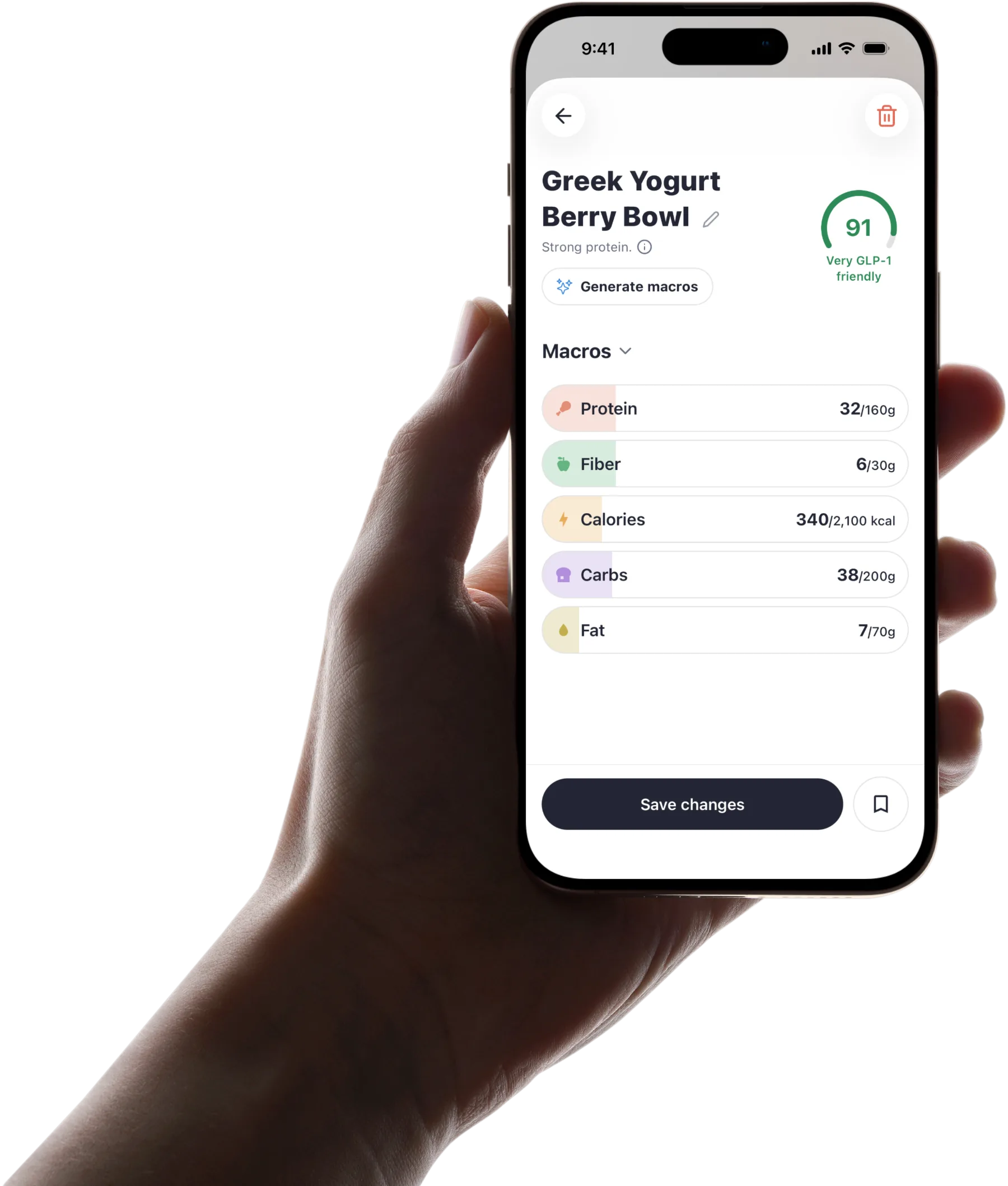
Published by Pep AI · GLP-1 score · Updated November 2026
It is a quick way to compare options when appetite is small and every bite counts. It is an estimate to help you choose, never medical or dietary advice.
The score is built on estimated nutrition. Treat it as a guide for comparing meals, not a verdict on what to eat.
Pep AI is free to try: a free download with a 3-day free trial, then a subscription for tracking. Pep AI is rated 4.7 stars from 3,900+ ratings on the US App Store. It has passed 200,000+ downloads on iPhone and Android.
What the Number Tells You
The GLP-1 score is a 0 to 100 number from a fixed formula. More protein and fiber for the calories score higher, while large, high-fat or carb-heavy meals score lower. It uses estimated nutrition and is not dietary advice.
| Score | Band in the app |
|---|---|
| 85 and up | Very GLP-1 friendly |
| 70 to 84 | GLP-1 friendly |
| Under 70 | Less GLP-1 friendly |
A Scale From 0 to 100 in Three Bands
Every scored meal in Pep AI lands somewhere between 0 and 100. Every score falls in one of three bands: Very GLP-1 friendly (85 and up), GLP-1 friendly (70 to 84) and Less GLP-1 friendly (under 70).
The scale makes two very different dishes easy to compare. You do not have to weigh up five separate numbers in your head.
Built From Five Inputs
Protein, as a share of the meal's calories, and fiber, in grams per calorie, raise the GLP-1 score in Pep AI, and very little protein lowers it. Fat from about 25 g up, a high share of calories from carbs, and a meal that is large compared with your own daily calorie goal lower it.
Sugar and sodium are not part of the score. A single small food under 250 calories, like a piece of fruit, is held to a gentler bar, and the full nutrition breakdown always sits next to the number.
Always an Estimate
The score comes from estimated nutrition, and restaurant portions and recipes vary. Treat it as a way to compare, not as an exact measurement.
The app's “How the GLP-1 score works” sheet explains that the score uses estimated nutrition and is a guide, not medical advice. In the app, each score shows with its band and a short reason.
Why Protein and Fiber Matter So Much on a GLP-1
Smaller Meals Change the Problem
Eating on a GLP-1 is a different problem from ordinary dieting. Appetite is no longer the thing you are fighting, and portions can shrink to a few bites.
That makes what is in those bites matter more. Pep AI is built for eating less, not counting harder.
Protein Is the First to Slip
Protein-rich food is filling, so it is often the part of the plate left behind. On small portions, the daily total can fall short without you noticing.
Pep AI puts protein at the top of your day for that reason. The score gives a quick read on it before you eat.
Fiber and Water Follow Close Behind
Fiber and fluid also drop when meals get smaller, and GLP-1 labels list constipation among the common side effects and warn about dehydration. Pep AI tracks fiber and water right next to protein.
Pep AI suggests protein and fiber goals during setup, and a number from your clinician or dietitian always comes first. The score just helps you compare along the way.
How to Use the Score to Compare Meals
Two generic dishes, scored with the app's formula for a 1,800-calorie daily goal. Scores depend on your own daily calorie goal, so the same meal can score differently for you.
| Example dish | Estimated nutrition | GLP-1 score |
|---|---|---|
| Grilled salmon with roasted vegetables | About 480 calories, 38 g protein, 6 g fiber, 26 g fat, 22 g carbs | 84, GLP-1 friendly |
| Fettuccine alfredo | About 1,100 calories, 30 g protein, 4 g fiber, 65 g fat, 95 g carbs | 19, Less GLP-1 friendly |
Compare Options Side by Side
The score is most useful when you hold two or three choices up against each other. Pep AI shows each option's number next to its estimated nutrition.
A clear gap between two dishes is worth noticing. A small gap usually means either one is a reasonable pick.
Check the Breakdown Too
Look at the estimated protein, fiber, carbs, fat and calories beside the number. The breakdown helps explain where the number came from.
Sometimes a lower-scoring dish is still the right call for you. The details help you decide.
Think in Days, Not Single Meals
One meal with a lower number does not undo a day. Pep AI shows how each meal fits the protein, fiber and water you have already logged.
Balance across the day matters more than any single score. Look at the whole day before you judge one meal.
Do Not Chase a Perfect 100
The score is a comparison tool, not a target to hit at every meal, and it is not dietary advice. Eating something you enjoy and can tolerate matters too.
Your clinician or dietitian is the right person to help set eating goals. Pep AI just makes comparing easier.
What the Score Does Not Do
Pep AI is a tracking and education app. It is not a medical device, and it does not diagnose or treat anything.
It Is Not Dietary Advice
The score helps you compare meals, but it does not tell you what you must eat. Pep AI is a tracking and education app, not a meal plan.
Eating goals that fit your health and medication belong with your clinician or a registered dietitian. The score supports those goals, never replaces them.
It Does Not Measure Your Medication
The score is about the food on your plate, not about your dose or how your GLP-1 is working. It is built from the meal's nutrition and your daily calorie goal.
Questions about your treatment belong with your prescriber. Pep AI never suggests a dose.
It Does Not Know Your Health History
With kidney disease, diabetes, pregnancy or a history of disordered eating, follow your clinician over any score. You can turn GLP-1 scores off in the app's settings.
The score has no way of accounting for your health history. Use it only to compare options within the plan your care team gave you.
Where You Will See the Score in Pep AI
Next to Your Daily Goals
Pep AI keeps protein, fiber and water goals on the same screen as your meals. Food logging by photo, menu scan, barcode, search, recents or quick log, or by telling Pep Bot, the in-app assistant, what you ate by typing or speaking, is covered on the GLP-1 food tracker page.
The GLP-1 score also shows on every meal photo scan and barcode scan. Your goals then show how the day adds up.
In the Same App as Your Doses
Pep AI tracks your meals, shots, weight and side effects in one app. Over a few weeks, you can look back at how eating lined up with the rest of your routine.
That replaces the notes app and the spreadsheet. Everything lives in one place.
Trusted by GLP-1 Users on iPhone and Android
4.7 Stars From 3,900+ App Store Ratings
Pep AI is rated 4.7 stars from 3,900+ ratings on the US App Store. It has passed 200,000+ downloads on iPhone and Android.
Those are people logging shots, meals and progress every week. Comparing meals is part of that same routine.
Food Logging People Enjoy
“The AI meal tracker does a great job when you take pics of meals.” That is how one Pep AI user described the food side of the app in an App Store review.
Quick logging and quick comparing go hand in hand. Both are built to take seconds.
Works With Popular GLP-1 Shots and Pills
Pep AI works with Ozempic®, Wegovy®, Mounjaro®, Zepbound®, Rybelsus® and Foundayo™, shots or pills. Each medication keeps its own schedule in the app.
Pep AI is not affiliated with or endorsed by Novo Nordisk or Eli Lilly. Brand names are trademarks of their respective owners. The labels for these medicines carry a boxed warning about the risk of thyroid C-cell tumors. Read the full label that comes with your medication.
The GLP-1 score at a glance
One number for comparing meals, with the nutrition behind it always in view.
A fixed formula
Protein and fiber for the calories raise it; fat, a high share of carbs and a big share of your daily calories lower it.
Three named bands
Very GLP-1 friendly (85 and up), GLP-1 friendly (70 to 84) and Less GLP-1 friendly (under 70).
A short reason
Each score shows with its band and a one-line reason, such as strong protein or heavy on fat.
On every scan
Meal photo scans, barcode scans and the best picks from a menu scan.
Full breakdown beside it
Estimated protein, fiber, carbs, fat and calories sit next to the number, so you can see where it came from.
Yours to turn off
Scores can be switched off in the app's settings whenever you would rather not see them.
Frequently asked questions
What Is a GLP-1 Score?+
It is a number from 0 to 100 that Pep AI gives a meal from a fixed formula, using its estimated nutrition and your daily calorie goal. More protein and fiber for the calories score higher. The GLP-1 score is meant for comparing options, not as dietary advice.
Is a Higher GLP-1 Score Always Better?+
Not always. A higher number usually means more protein and fiber for the calories, less fat, or a smaller share of your daily calorie goal. It is based on estimated nutrition and cannot account for your tastes, tolerance or health conditions. Use it to compare, and check the nutrition breakdown before you decide.
Which Nutrients Affect the Score?+
Protein and fiber raise the score. Fat, a high share of carbs, and a meal that takes a big share of your daily calorie goal lower it. Sugar and sodium aren't part of the score. The full breakdown of protein, fiber, carbs, fat and calories sits next to the number.
Does the Score Tell Me What to Eat?+
No. It helps you compare meals, but the choice is always yours. For eating goals that fit your health and medication, talk to your clinician or a registered dietitian, and use the score to compare options within that plan.
Where Can I See the Score?+
On every meal photo scan and barcode scan, and on the picks from a menu scan. A menu scan scores its best few picks, not every dish. You can turn scores off in the app's settings.
Is Pep AI Free to Try?+
Yes. Pep AI is a free download with a 3-day free trial, so you can compare a few meals before deciding. After the trial, tracking needs a paid subscription. Cancel at least 24 hours before the trial ends and you are not charged; the App Store or Google Play shows the exact date.
Does Pep AI Work on Android?+
Yes. Pep AI is on Google Play and the App Store with the same food features on both. Your meals, goals and doses are all in the same app on either phone.
Start tracking smarter today.
Free to try on iPhone and Android.