
The AI Food Scanner App That Logs a Meal From One Photo
Take a photo of your plate and Pep AI estimates protein, carbs, fat, fiber and calories, with a GLP-1 score from 0 to 100.


Published by Pep AI · AI food scanner · Updated November 2026
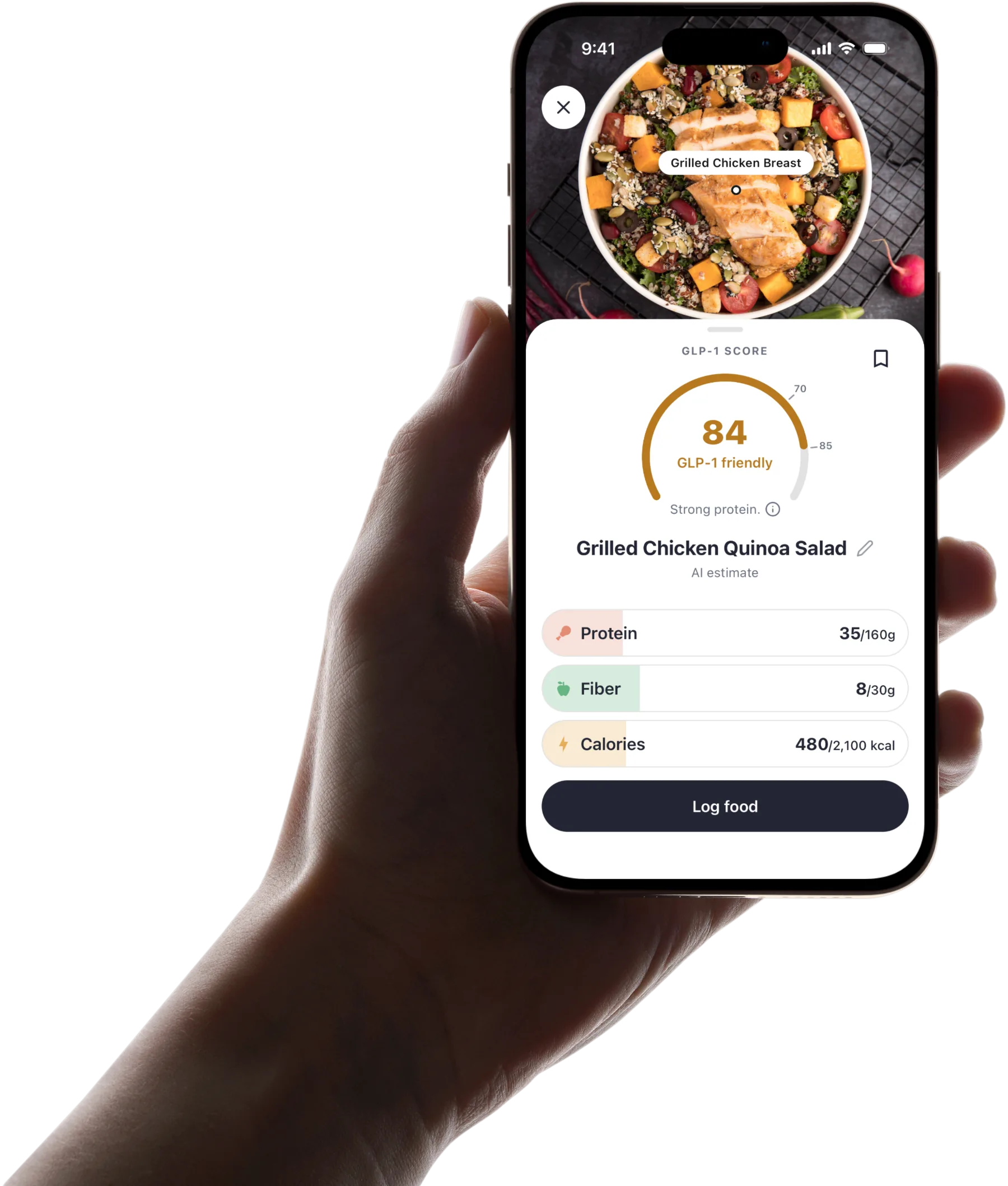
Take a photo of your plate and Pep AI fills in an estimate of protein, carbs, fat, fiber and calories. The first thing on the result is the meal's GLP-1 score, from 0 to 100. A small lunch is logged in seconds, without a database search.
Barcode scan, menu scan, search, recents and quick log are there for everything a photo cannot handle. Every meal lands in the same app as your GLP-1 doses, weight and side effects.
Nutrition values and the GLP-1 score are estimates and a guide for comparing, not dietary advice. Pep AI is free to try: a free download with a 3-day free trial, then a subscription for tracking.
From Plate to Log in Three Steps
Logging a meal from a photo takes three steps and a few seconds.
Open the Camera in Pep AI
Tap to scan a meal and the camera opens inside Pep AI, ready to go.
Fit the whole plate in the frame in good light. That gives the estimate more to work with.
Review the Estimate
Pep AI reads the photo and shows the meal's GLP-1 score first, with its band and a short reason, then estimated protein, carbs, fat, fiber and calories. Treat the numbers as a guide rather than an exact measurement, and adjust them if something looks off.
If the plate is hard to read, search the food database or quick log the numbers instead. Both take only a few taps.
Save It to Your Day
Once saved, the meal counts toward your daily protein, fiber and calorie goals, and the day's totals update straight away.
Ate only half? Edit the numbers before you log it. Small portions are normal on a GLP-1.
More Ways to Log When a Photo Is Not the Fit
Barcode for Packaged Food
Scan the barcode on a shake, bar or snack and Pep AI fills in the nutrition from the product's label data, with its GLP-1 score and what raises or lowers it. When a product scores under 70, Pep AI can show similar products that score higher.
Your regular items then sit in recents for one-tap logging. The morning shake becomes a two-second job.
Search and Recents
Search the food database by name, or tap a food you logged before. Repeat meals become the fastest entries in Pep AI.
Many people on a GLP-1 settle into a short list of foods that sit well. Recents keeps that list close.
Quick Log for Known Numbers
Already know the macros? Quick log lets you type them straight in.
It works for home recipes and labels you know by heart. The totals count toward your day all the same.
What the Scan Puts First on a GLP-1 Day
Most scanner apps lead with calories. On a GLP-1 the risk is too little protein, fiber and water, so that is what Pep AI puts first.
Protein and Fiber at the Top
Every scanned meal updates protein and fiber first, because those are the numbers that slip when portions shrink. You see early in the day whether the next meal needs to carry more.
Calories, carbs and fat are still there when you want them. They simply are not the headline.
Water Alongside
Pep AI tracks water next to protein and fiber, with optional reminders. On smaller meals, fluid is easy to forget.
All three goals share one screen, so a quick glance shows what the rest of the day needs.
Estimates, Not Exact Numbers
Every photo scan gives an estimate, built to show the shape of a meal quickly. It is meant for checking your day, not for exact measurement.
For exact numbers, a barcode or the package label wins. Pep AI offers both.
Higher-Protein Ideas When You Need Them
A GLP-1 friendly section in Pep AI lists higher-protein shakes, bars, snacks and restaurant options. It helps on days when cooking is not happening.
Log a pick with a barcode scan or a search and it goes straight into your day. For a shopping list to go with it, see the GLP-1 grocery list.
Meals Next to Your Shots and Side Effects
A stand-alone scanner only knows what you ate. On a GLP-1, the useful part is keeping meals in the same record as doses and symptoms.
One App for the Whole Week
Every scanned meal is logged in the same app as your doses, weight and side effects, so the week reads as one record instead of five apps.
That replaces the notes app, the calendar reminder and the spreadsheet.
See What You Ate Before a Rough Day
Log nausea or fatigue by day with a severity, and you can see what you ate earlier that day. The GLP-1 side effect tracker page covers symptom tracking in more depth.
Patterns like this are worth raising with your prescriber, who can tell you what they mean for you.
How Eating Changes After Shot Day
Because doses and meals are in one app, you can look at how your eating shifts in the days after each shot. Low-protein stretches stand out.
Seeing it makes the next shot week easier to plan. Your clinician or dietitian can help with the details.
What Pep AI Users Say About Photo Logging
Photo Scans That Do the Job
“The AI meal tracker does a great job when you take pics of meals.” That is how one Pep AI user described the photo scan in an App Store review.
Quick logging is what keeps people tracking past the first week. A photo is less work than any search.
4.7 Stars From 4,000+ App Store Ratings
Pep AI is rated 4.7 from 4,000+ ratings on the App Store, and it has passed 200,000+ downloads across iPhone and Android.
Those are people logging meals, shots and progress every week.
Every way to log a meal on a GLP-1
Photo first, with an option for every meal a photo cannot read.
Meal photo scan
Snap your plate and get estimated protein, carbs, fat, fiber and calories, with the GLP-1 score first.
Barcode scan
Nutrition from the product's label data and its GLP-1 score, with higher-scoring alternatives when it scores under 70.
Menu scan
Scan a restaurant menu and get 3 to 5 “Best picks” ranked by GLP-1 score.
Search, recents and quick log
Search the food database, re-log a recent food in one tap, or type in macros you already know.
Protein, fiber and water
Personalized daily targets from setup, with protein and fiber leading the day and water tracked alongside.
Food next to your doses
Meals sit in the same app as your shots, weight and side effects, so a rough day comes with context.
Frequently asked questions
How Accurate Is an AI Food Scanner App?+
Photo scans give an estimate, not an exact measurement. Portion size, sauces and hidden ingredients can shift the numbers, so check them and adjust anything that looks off. For packaged food, a barcode scan uses the product's label data.
Can Pep AI Scan Barcodes Too?+
Yes. Pep AI scans barcodes on packaged foods like shakes, bars and snacks and fills in the label's nutrition with a GLP-1 score. Foods you log often stay in recents, so the next entry takes one tap.
Does It Work for Very Small Portions?+
Yes. A photo scan estimates what is on the plate; if you ate only part of it, edit the numbers before you log. Pep AI is built around the small portions that are common on a GLP-1, with protein and fiber shown first.
What Is the GLP-1 Score?+
A 0 to 100 rating from a fixed formula, using a meal's protein, fiber, fat and carbs and its share of your daily calories. 85 and up is very GLP-1 friendly, 70 to 84 is GLP-1 friendly, and under 70 is less GLP-1 friendly. It shows on meal photo, barcode and menu scans, and it is a guide, not dietary advice.
Is Pep AI Free to Try?+
Yes. Pep AI is a free download with a 3-day free trial, so you can set up your medication and log a few days before deciding. After the trial, tracking needs a paid subscription. Cancel at least 24 hours before the trial ends and you are not charged; the App Store or Google Play shows the exact date.
Does Pep AI Give Dietary Advice?+
No. Pep AI is a tracking and education app, not a meal plan or a medical device. Setup builds personalized daily targets you can change, and a clinician or registered dietitian can help set goals that fit your health and medication. With kidney disease, diabetes, pregnancy or a history of disordered eating, follow your clinician over any score.
Does the Scanner Work on Android?+
Yes. Pep AI is on Google Play and the App Store with the same food scanning on both. It works alongside Ozempic®, Wegovy®, Mounjaro®, Zepbound® and daily GLP-1 pills, and it is not affiliated with Novo Nordisk or Eli Lilly.
Start tracking smarter today.
Free to try on iPhone and Android.